Built by a working builder in WA

Construction admin that connects every company on the job.

Progress claims, variations, take offs, bills, timesheets and site diaries in one place. Builders, contractors, subbies and their crews each run their own account, linked on the job.

GST, ABN and ABA bank filesXero, MYOB, QuickBooksFree for workers
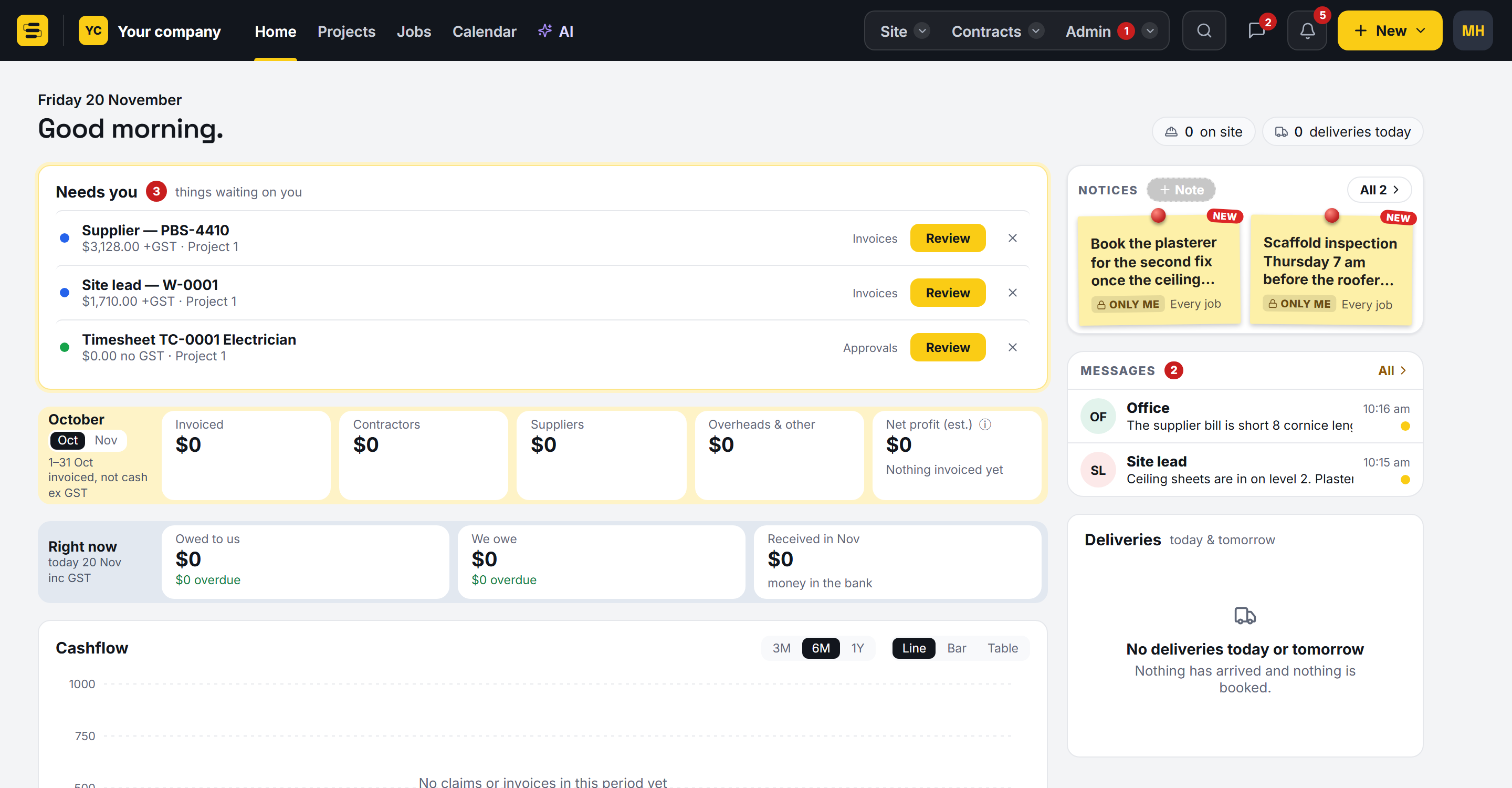
Sitewear Home: things waiting on you, money this month and notices
✦ AI built in

Ask it, drop files on it, take a photo.

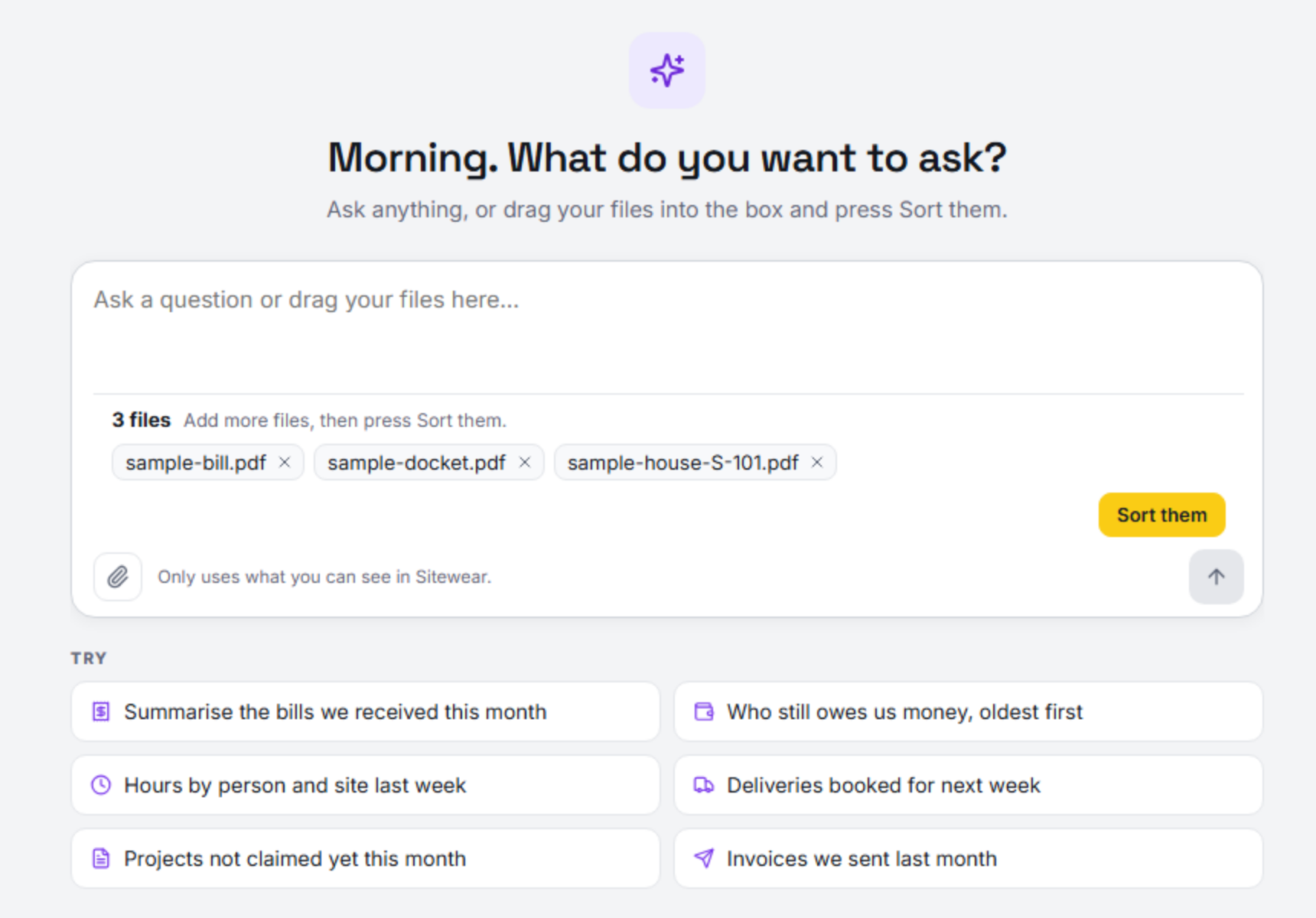
The AI page in Sitewear answers from your own jobs and sorts whatever you drop on it. It does the reading and typing, and a person always presses Send.

  • Ask anythingWho owes you, what's on order, whose timesheets are in, or how to do something in Sitewear. Reports open as Excel or PDF.
  • Drop any filesBills, dockets, contracts, certificates and drawings, all at once. It works out what each one is and which job it belongs to.
  • Reads your photosDockets and receipts are read line by line, and site photos sort themselves to the right job and day.
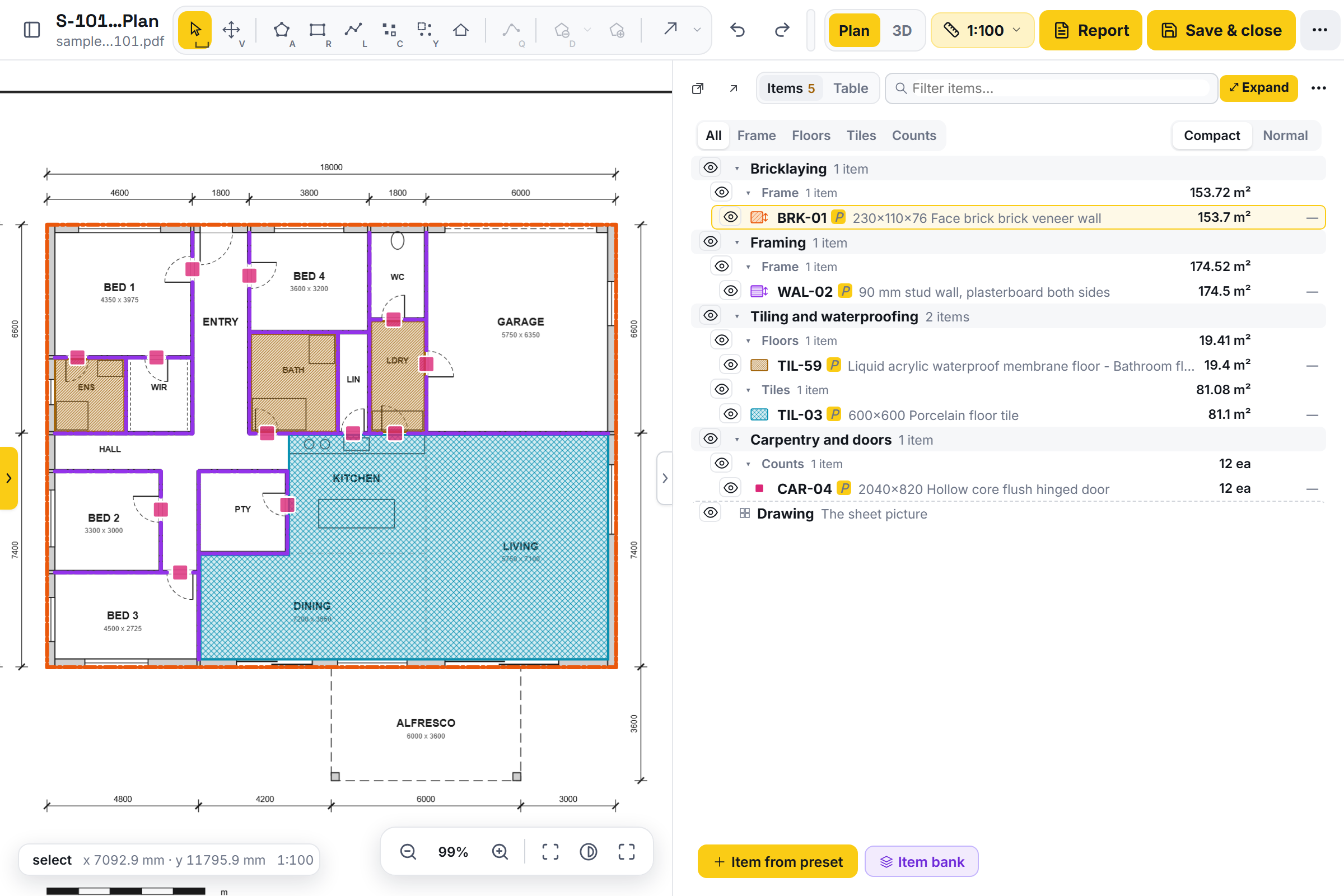
  • Measures your plansAI Take off measures floors, walls and openings, ready to check and quote.
Sitewear's AI page with three files dropped in, ready to sort, and suggested questions

One app for everyone on the job

Each company gets the screens its kind of business needs. When a builder brings a trade onto a job, they share that job and nothing else.

Builders

Projects, contracts, progress claims, purchase orders to trades and job costs.

Contractors

Claim against the builder, run your own crew and subbies, order materials.

Subbies & labour hire

Orders in, crew hours, timesheet claims and invoices out.

Workers

Free. Hours, photos, drawings and invoices on the phone, in their own language.

Everything the office does for a job

Measure, quote, claim and get paid without a spreadsheet. Here's how each part works.

Progress claims

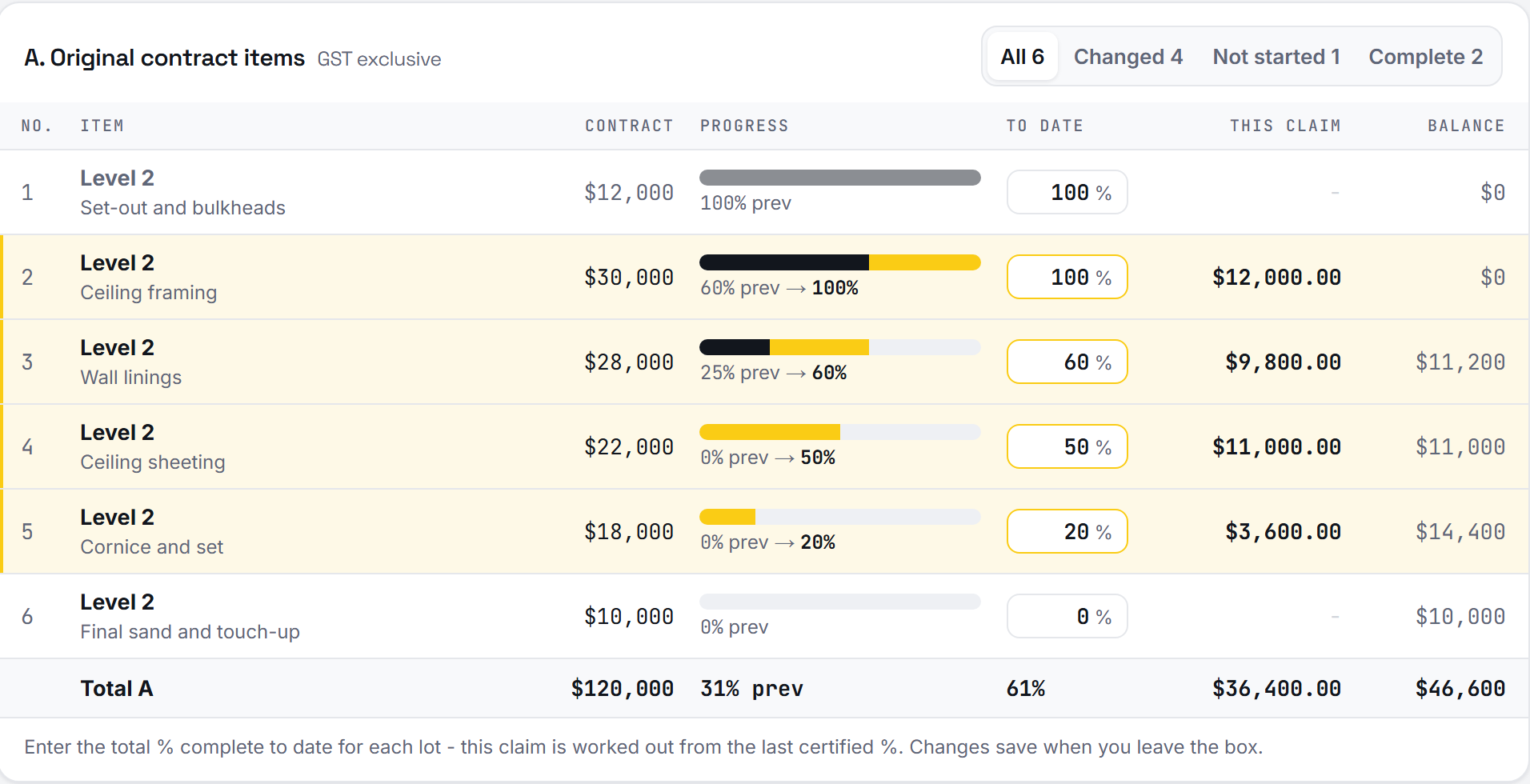
Upload the contract once and every claim starts from last month's certified percentages. Retention, GST and the tax invoice are worked out for you, and the client approves from an email link.

Variations

Price the extra work on site or in the office and send it for a signature. Once it's approved it goes onto the next claim by itself, so nothing gets missed.

Take off & quotes

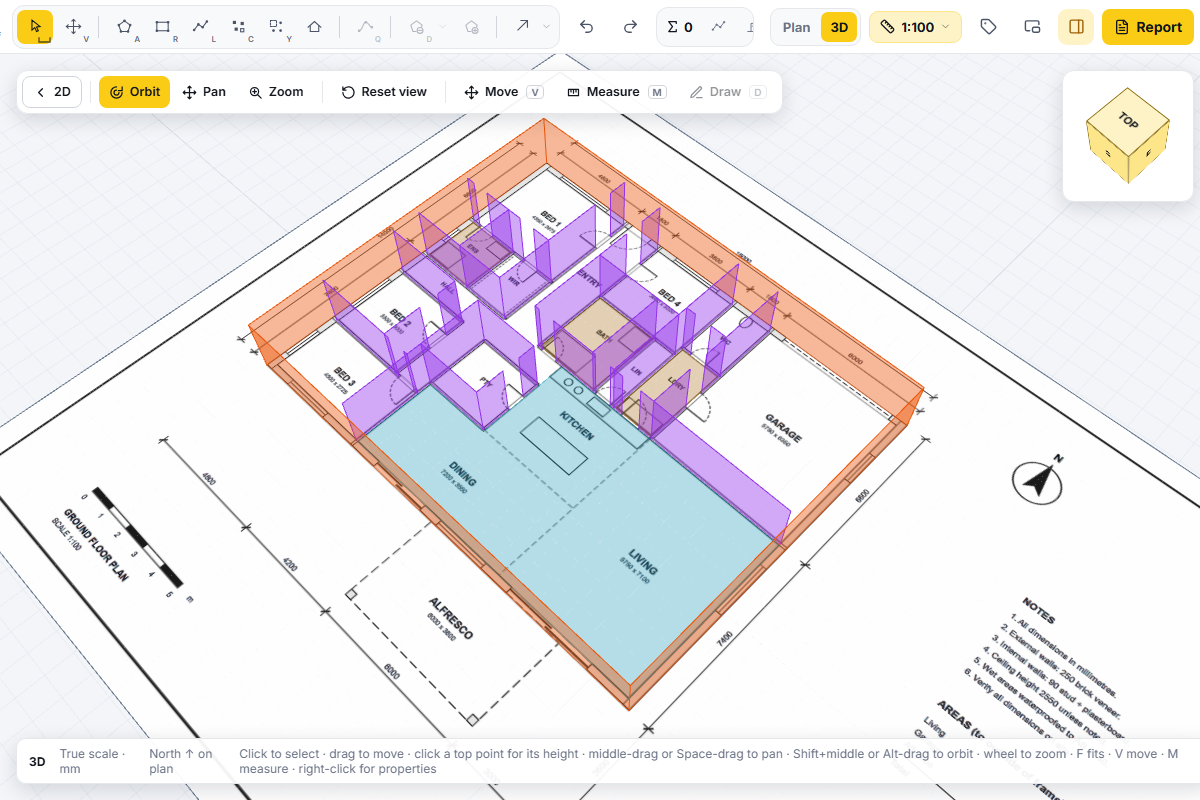
Measure areas, lengths and counts on the drawing, or let AI Take off do it. Check it in 3D, then one button turns the quantities into a quote.

Bills & dockets

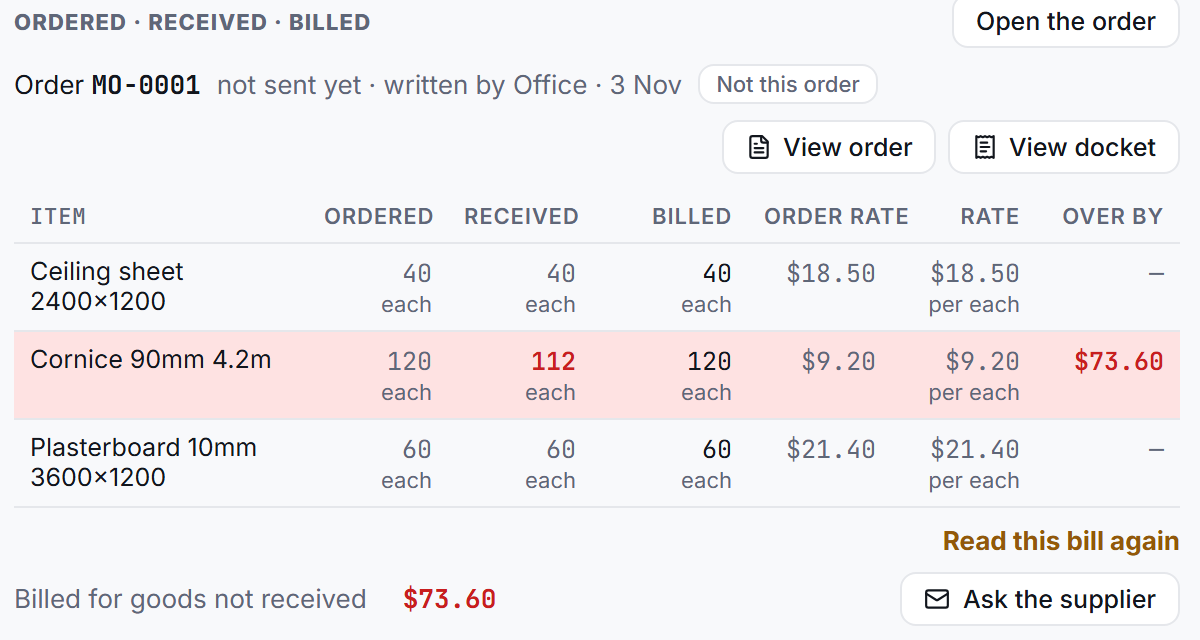
Snap the docket when the load arrives. When the bill comes in, anything short or over-priced is flagged before you pay, with a button to ask the supplier.

Timesheets & pay

The crew clock on at the job from their phone. You check the week, approve it, and pay everyone with one bank file for your bank.

Site diary

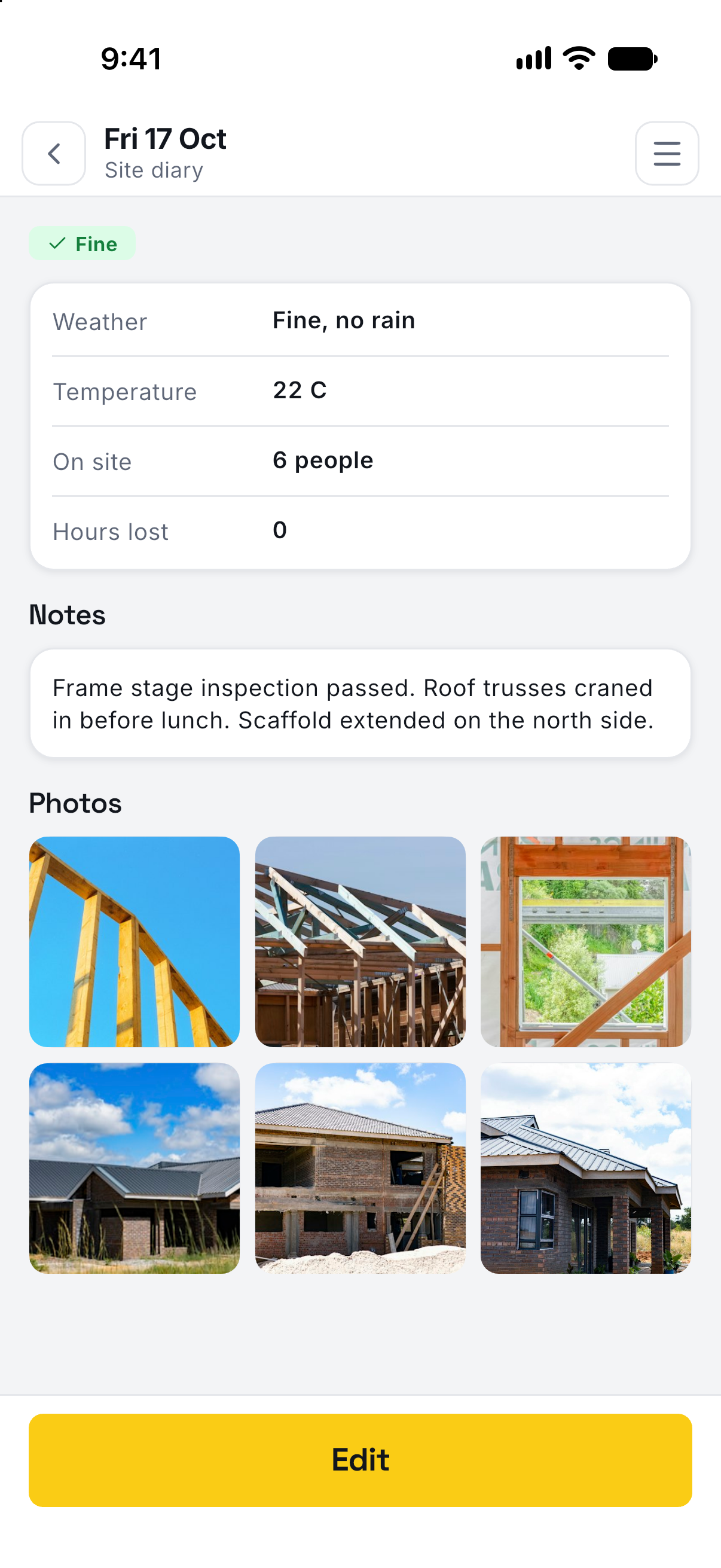
The weather and the people on site fill themselves in. Add notes and photos from the phone, or copy yesterday's entry and change what's different.

Drawings

The latest revision is always on top, with the changes clouded. Mark up sheets with notes and photos on a computer, an iPad or the phone, and share them with the trades on the job.

Messages

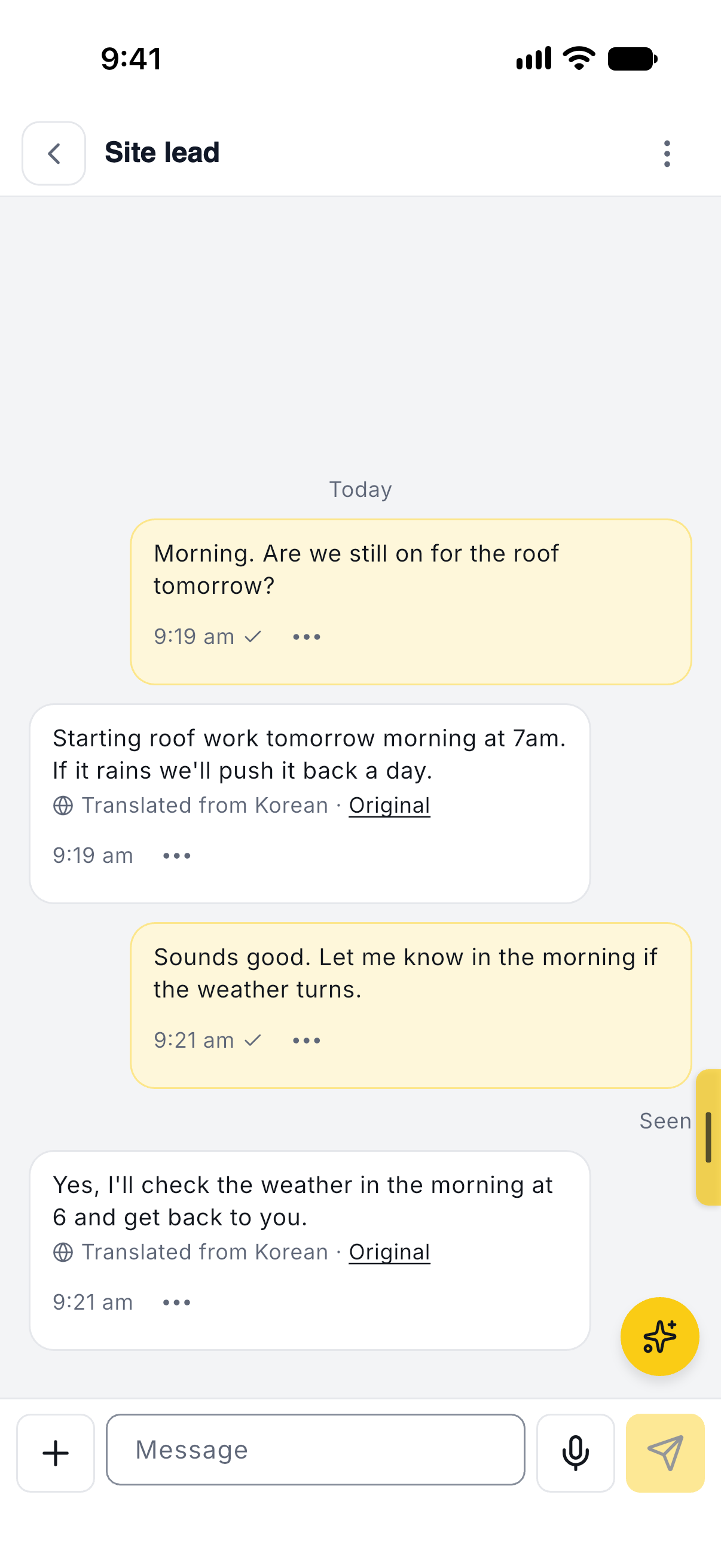
Get work chat off your personal phone. Message the crew, trades and the office from the desk or the Sitewear app, each reading it in their own language.
Measure off the plans, then quote it

Let AI Take off measure floors, walls and openings, or measure them yourself. Check it in 3D, then turn the quantities into a priced quote.

  • Areas, lengths and counts at the drawing's scale
  • 3D view to catch a missed wall
  • Quote and claim sheet straight from the measurements

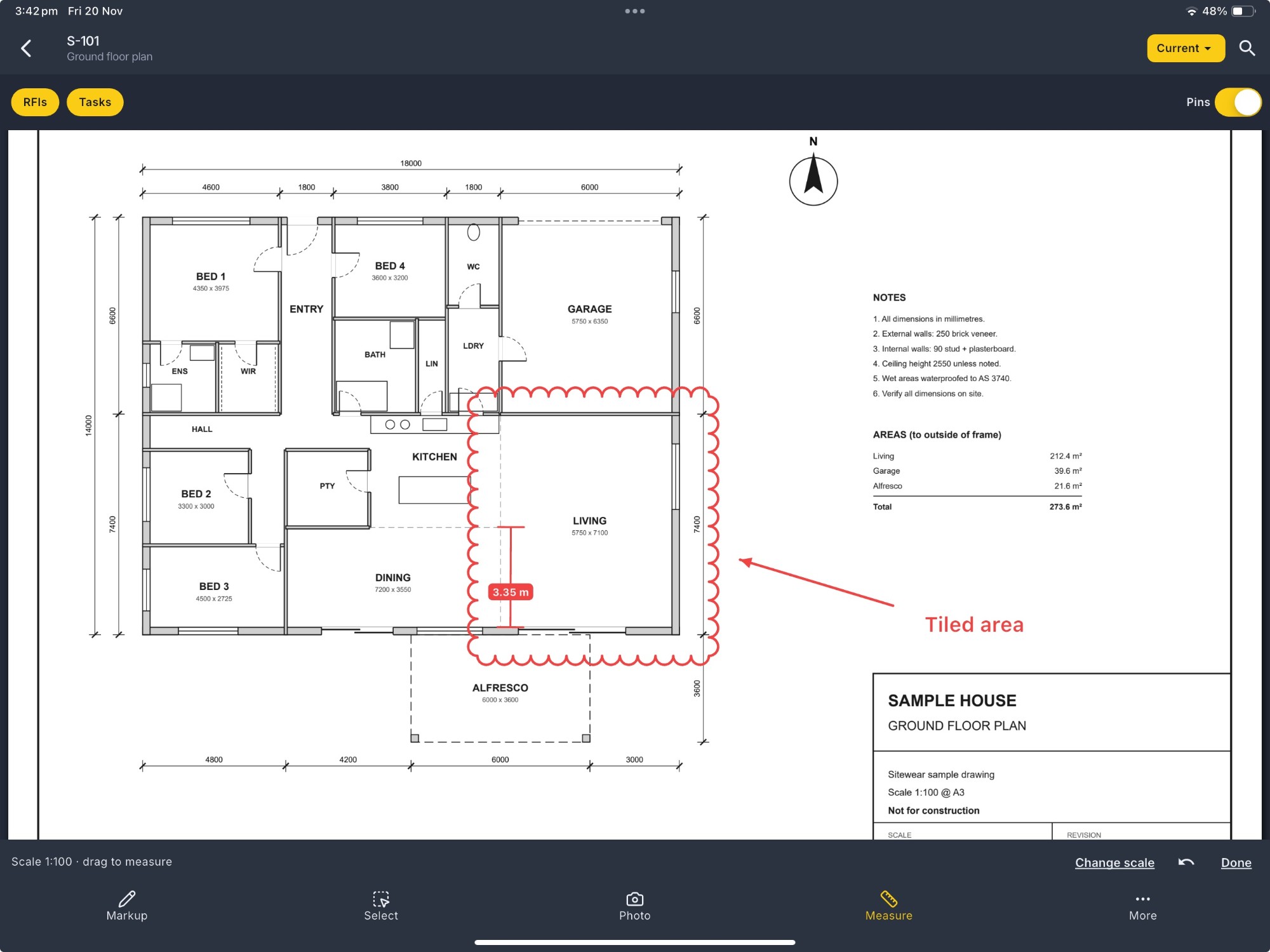
Mark up drawings on an iPad

Open the latest sheet on an iPad and write on it with Apple Pencil: clouds, notes, measurements and photos placed right on the plan. Everyone on the job sees the same markups.

  • Draw with Apple Pencil, scroll and zoom with your fingers
  • Photos from the iPad camera placed on the sheet
  • Sheets kept on the iPad for sites with no signal
A sample house plan in the Sitewear app on an iPad, with a clouded tiled area, an arrow, a note and a measurement

Claims that add up, with retention worked out

Upload the contract once. Each month starts from last month's certified figures, so you only put in this month's progress.

  • Retention rate, cap and release dates handled
  • Approved variations on the same claim
  • The client approves from a link, no login
A progress claim sheet with stages, percentages, a variation and retention

Bills checked before you pay

Take a photo of the delivery docket and Sitewear tells you what's short. When the bill comes in, it's compared with what was ordered and what turned up.

  • Short or over-billed lines in red
  • Price rises held with a button to ask the supplier
  • Duplicates, ABN and changed bank details checked
A supplier bill checked against the order and the delivery docket

Made to be used on site

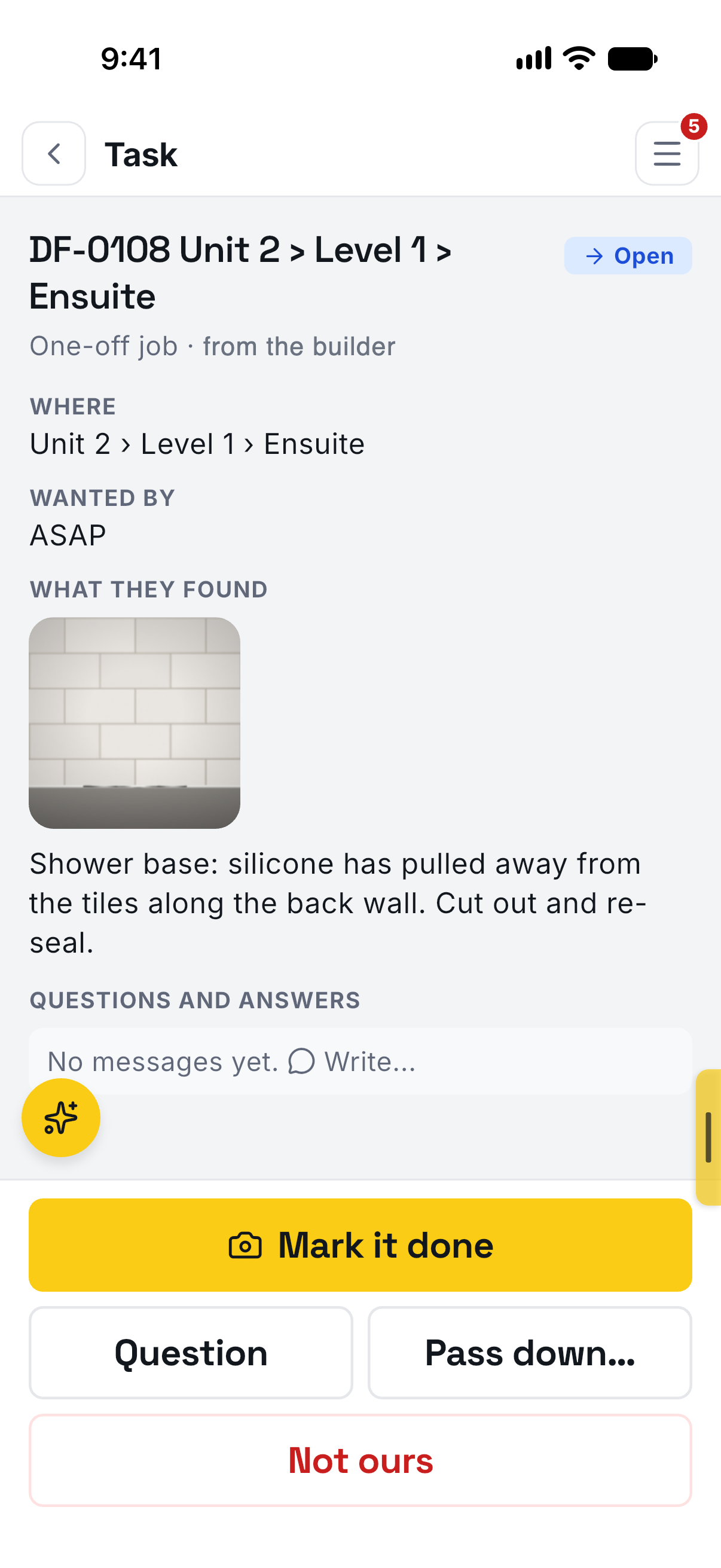
The crew log hours, take photos and work through defects on their phone. Messages are translated for each reader.

  • Defects with photo, location and who's doing it
  • Site diary with the weather filled in
  • Messages in their own language

Your trades use their own Sitewear, on your job

Give a trade work with a purchase order. They join free from the email and the job shows up in their account with the drawings, task lists and programme you share.

They only see the jobs you give them. Clients and suppliers who aren't on Sitewear can still approve or send an invoice from an email link.

C
ClientApproves claims and variations from a link
CLAIMS · INVOICESORDERS · DRAWINGS
B
BuilderRuns the project, lets work to trades
CLAIMS · HOURSTASK LISTS · PROGRAMME
T
Contractors, subbies and crewsEach in their own account, linked on the job
Built by a builder

Made by a working builder who runs his own jobs on it

Sitewear is built in Perth by a builder who runs his own jobs on it.

We use it on our own jobs every day, so when something is slow or confusing on site, we find out first.

Works with your accounting software

Sent invoices and approved bills go across, and payments come back marked paid.

Xero
MYOB
QuickBooks

Questions builders ask

Do my subbies and workers have to pay to connect with me?

No. Your workers get a free account, and it stays free. A subbie or trade you give work to joins free from the purchase order email and is connected to your job straight away.

Can my clients approve claims and variations by email?

Yes. Your client gets an email with Approve and Ask for changes buttons, so they don't need to sign up for anything. If they want to follow the job, they can have a free owner account.

Does it handle retention and GST?

Yes. Retention is worked out on every claim, with the cap and release dates, and GST is worked out on claims, invoices and bills.

Is there a phone app?

Yes. The crew use the phone app for hours, photos, the site diary, defects, drawings and messages.

Can I bring in my existing jobs and contacts?

Yes. Just drag and drop your existing files, like spreadsheets, contact lists and invoices, and Sitewear brings in your contacts, staff, jobs and invoices for you to check.

Become a beta tester

Sitewear is in beta. Apply, tell us a bit about your business, and we'll get in touch.

Apply for the beta